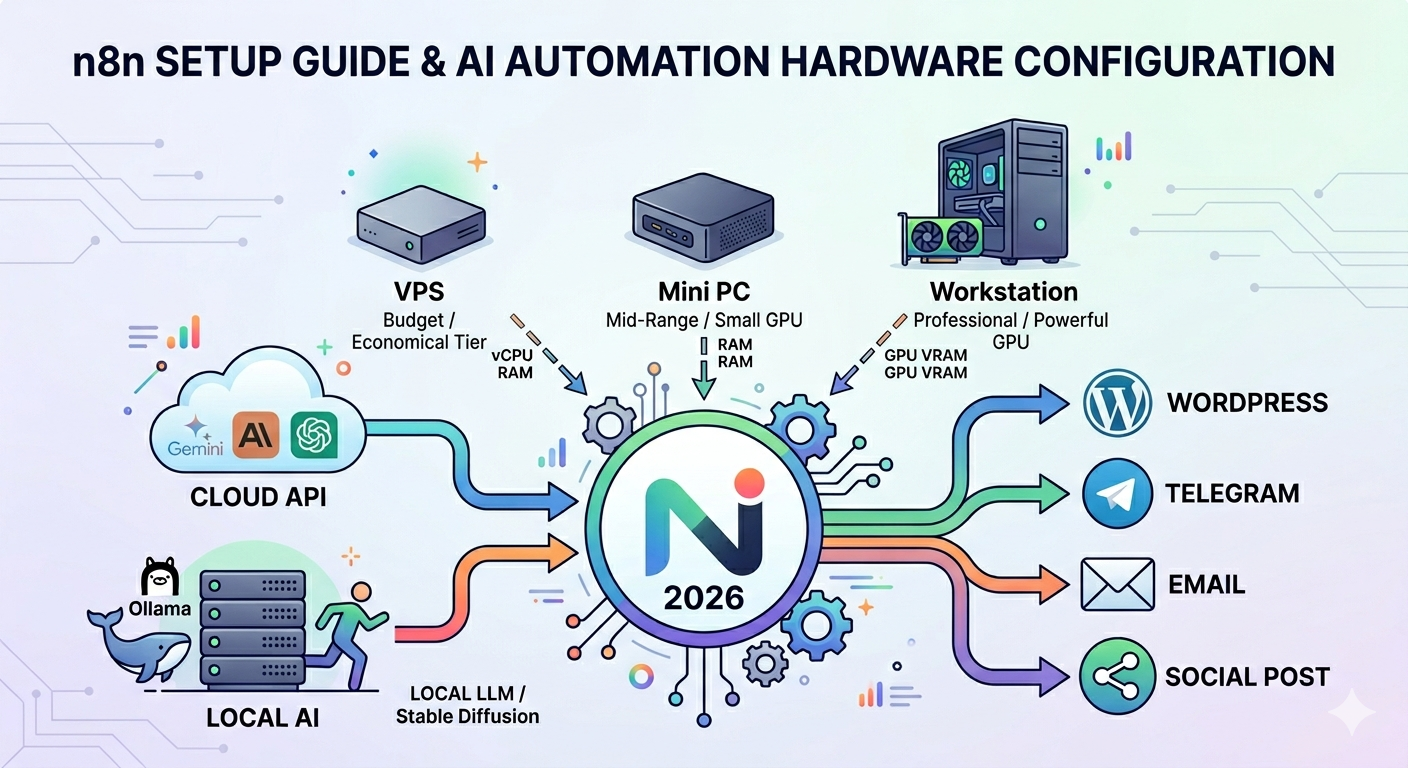
For years, automation tools were mostly associated with enterprise IT departments and no-code enthusiasts. But in 2026, platforms like n8n have quietly become the infrastructure layer powering a new generation of AI-driven businesses.
From AI blogging systems and autonomous content pipelines to local LLM workflows and image-generation stacks, n8n is increasingly becoming the “operating system” behind modern automation.
The problem?
Most beginners dramatically overspend — or underspec — their hardware.
Some buy expensive GPU workstations when a $10 VPS would do the job. Others attempt to run local AI agents on CPU-only mini PCs and wonder why their workflows crawl at unusable speeds.
The reality is simple:
Your hardware should match your workflow — not AI hype.
Here’s what you actually need to run n8n efficiently in 2026.
First: n8n Isn’t the AI
One of the biggest misconceptions around n8n is that it’s “doing the AI work.”
It isn’t.
n8n is a workflow orchestrator.
Think of it as the connective tissue between services:
- Gemini generates text
- Claude summarizes content
- Leonardo AI creates images
- WordPress publishes posts
- Telegram sends alerts
- n8n coordinates everything
That distinction matters because it changes your hardware requirements completely.
If you’re mostly calling cloud APIs, your server barely needs any power.
If you’re running local AI models, everything changes.
Scenario 1: n8n + Gemini API + WordPress Automation
This is by far the most common setup in 2026.
Typical workflows include:
- AI-generated blog posts
- SEO automation
- Social media posting
- Telegram bots
- RSS aggregation
- Content translation
- WordPress publishing
In this setup, nearly all heavy computation happens in the cloud.
Your server is mostly moving data between APIs.
Recommended Hardware
| Component | Recommendation |
|---|---|
| CPU | 2 vCPU |
| RAM | 2–4GB |
| Storage | 40–80GB SSD |
| OS | Ubuntu 24.04 |
That’s it.
A basic Linux VPS is enough for most AI publishing systems.
Estimated Cost
- $5–12/month VPS
- Or a small mini PC under $200
For creators running AI-powered media sites, this is usually the sweet spot.
When a Cheap VPS Is the Smartest Choice
A lightweight VPS is ideal if your workflow relies on:
- Gemini API
- OpenAI API
- Claude API
- Cloud image generators
- WordPress automation
- Marketing automation
In other words:
If the AI runs somewhere else, your hardware doesn’t need to be powerful.
This is why many successful AI publishing systems run comfortably on surprisingly cheap infrastructure.
Scenario 2: Local LLMs Change Everything
The equation changes the moment you start running local models through:
- Ollama
- LM Studio
- vLLM
- Open WebUI
- Local AI agents
Now your machine becomes the AI server itself.
And this is where many people make costly mistakes.
Yes, You Can Run Local LLMs on CPU
Technically, it works.
Practically, it’s painful.
A CPU-only system might generate:
| Model | CPU Only | GPU |
|---|---|---|
| Gemma 7B | 1–3 tokens/sec | 40–100+ tokens/sec |
| Qwen 14B | Nearly unusable | Smooth |
| Llama 3 | Slow | Production-ready |
That difference matters enormously in automation.
If your workflow includes:
- long article summarization
- AI agents
- chatbot systems
- bulk content generation
then CPU-only inference quickly becomes a bottleneck.
In Modern AI Infrastructure, VRAM Is King
For local AI workloads:
VRAM matters more than almost anything else.
More VRAM allows you to:
- run larger models
- increase context windows
- reduce latency
- handle concurrent workflows
- improve inference speed dramatically
This is why GPUs remain the defining component of modern AI systems.
Recommended GPUs in 2026
Entry-Level AI Workstation
| GPU | VRAM | Best For |
|---|---|---|
| RTX 3060 12GB | 12GB | Stable Diffusion basics |
| RTX 4060 Ti 16GB | 16GB | Light local AI |
Best Price-to-Performance Tier
| GPU | VRAM | Best For |
|---|---|---|
| RTX 4070 Ti Super | 16GB | Professional AI workflows |
| RTX 4080 Super | 16GB | AI startups |
Enterprise AI Tier
| GPU | VRAM | Best For |
|---|---|---|
| RTX 4090 | 24GB | AI agents + video AI |
| RTX 5090 | 32GB+ | Enterprise AI systems |
Stable Diffusion and Video AI Require Different Thinking
Once you move into:
- Stable Diffusion
- Flux
- ComfyUI
- Video AI
- AI avatars
- AI marketing pipelines
GPU performance stops being optional.
Now thermals, VRAM capacity, and sustained inference speeds become critical.
This is also the point where cloud GPU costs start becoming dangerous.
Why Buying a GPU VPS Often Doesn’t Make Sense
GPU VPS pricing in 2026 remains expensive:
- $100–500/month
- Sometimes significantly higher
For creators or startups running daily AI workloads, building a local workstation often becomes cheaper within months.
Especially for:
- image generation
- AI video
- local AI agents
- heavy inference workloads
Mini PCs Are Surprisingly Good for Automation
One of the biggest trends in 2026 is the rise of low-power mini PCs for AI automation.
Systems based on:
- Intel N100
- Ryzen 5800H
- Ryzen AI chips
are more than capable of running:
- n8n
- Docker
- WordPress automation
- API-based AI workflows
- Telegram bots
efficiently and quietly.
They consume little power and are ideal for 24/7 operation.
What they are not good at:
- Stable Diffusion
- AI video generation
- large local LLMs
- multi-user inference
Docker Is the Recommended Deployment Method
If you plan to run n8n long term, Docker is the safest path.
It simplifies:
- updates
- backups
- migrations
- scaling
- disaster recovery
And more importantly:
It makes your automation stack reproducible.
Don’t Use SQLite for Production
This is one of the most common beginner mistakes.
By default, n8n uses SQLite if no database is configured.
SQLite is fine for:
- testing
- learning
- tiny workflows
But once your system grows, issues appear quickly:
SQLITE_BUSY: database is lockedThis becomes especially common when:
- multiple workflows execute simultaneously
- execution history grows
- AI workflows run continuously
- queue systems expand
PostgreSQL Should Be the Default Choice
If you’re building:
- AI publishing systems
- content farms
- automation businesses
- multi-user AI workflows
- production AI infrastructure
then PostgreSQL is the better long-term choice.
Production Docker Compose Example
version: '3.8'

services:
  postgres:
    image: postgres:16
    restart: always
    environment:
      POSTGRES_USER: n8n
      POSTGRES_PASSWORD: strongpassword
      POSTGRES_DB: n8n

  n8n:
    image: n8nio/n8n
    restart: always
    ports:
      - "5678:5678"

    environment:
      - DB_TYPE=postgresdb
      - DB_POSTGRESDB_HOST=postgres
      - DB_POSTGRESDB_DATABASE=n8n
      - DB_POSTGRESDB_USER=n8n
      - DB_POSTGRESDB_PASSWORD=strongpassword
Security Is Where Most Beginners Fail
One of the most dangerous mistakes people make is exposing port 5678 directly to the internet without protection.
That’s effectively an invitation for attackers.
If compromised, your system may expose:
- API keys
- WordPress credentials
- Telegram bots
- AI workflows
- customer data
At minimum, enable basic authentication:
- N8N_BASIC_AUTH_ACTIVE=true
- N8N_BASIC_AUTH_USER=admin
- N8N_BASIC_AUTH_PASSWORD=yourstrongpassword
You should also use:
- UFW firewall
- Nginx reverse proxy
- HTTPS
- Cloudflare Tunnel
for production deployments.
The “Instant Recommendation” Hardware Table
For most people, the fastest way to choose hardware is this:
| Primary Need | Recommended Setup | Estimated Cost |
|---|---|---|
| AI websites, chatbots, WordPress automation | 2 vCPU VPS / 4GB RAM | ~$10/month |
| AI blogging + Telegram automation | Intel N100 Mini PC / 16GB RAM | $150–250 |
| Automation + light local LLMs | Ryzen 7 Mini PC / 32GB RAM | $350–500 |
| Professional local AI workflows | Ryzen 9 + RTX 4060 Ti | $1,000–1,500 |
| Stable Diffusion + AI image generation | RTX 3060 12GB or higher | $1,000+ |
| Video AI + AI agents | RTX 4090/5090 systems | $3,000–6,000+ |
| AI startup infrastructure | Threadripper + multi-GPU | $6,000+ |
So What Should You Actually Buy?
Most people building AI automation systems today do not need a massive AI workstation.
If your workflows rely on cloud APIs:
A cheap VPS is usually enough.
If you want local inference, Stable Diffusion, or AI agents:
Invest in VRAM first.
And if you plan to scale an AI business long term:
Design your infrastructure for reliability, not just raw power.
That means:
- Docker
- PostgreSQL
- backups
- security
- scalable workflows
Because in the AI era, infrastructure is quickly becoming the real competitive advantage.